Objective
Create an application that solves a simple problem by accepting input of some kind, processing it, and producing appropriate output.
Purpose
An opportunity, in the form of an in-class assignment, to demonstrate your understanding of how to:
- build simple user interfaces
- use input controls (whichever combination is appropriate):
StepperSliderTextFieldButtonToggle
- process input to produce appropriate output, using either computed property, a function, or both
- use a dynamic array
Success criteria
-
You make a plan in the form of an input-process-output chart where you identify inputs, describe processing steps, and then identify outputs.
-
Your program successfully accepts input, uses that input, and produces correct output.
-
Your program handles incorrect input gracefully (i.e.: it does not crash).
-
You have written code that is well formatted and readable.
-
Your project is organized with groups for
ViewsandModelcode, as appropriate. -
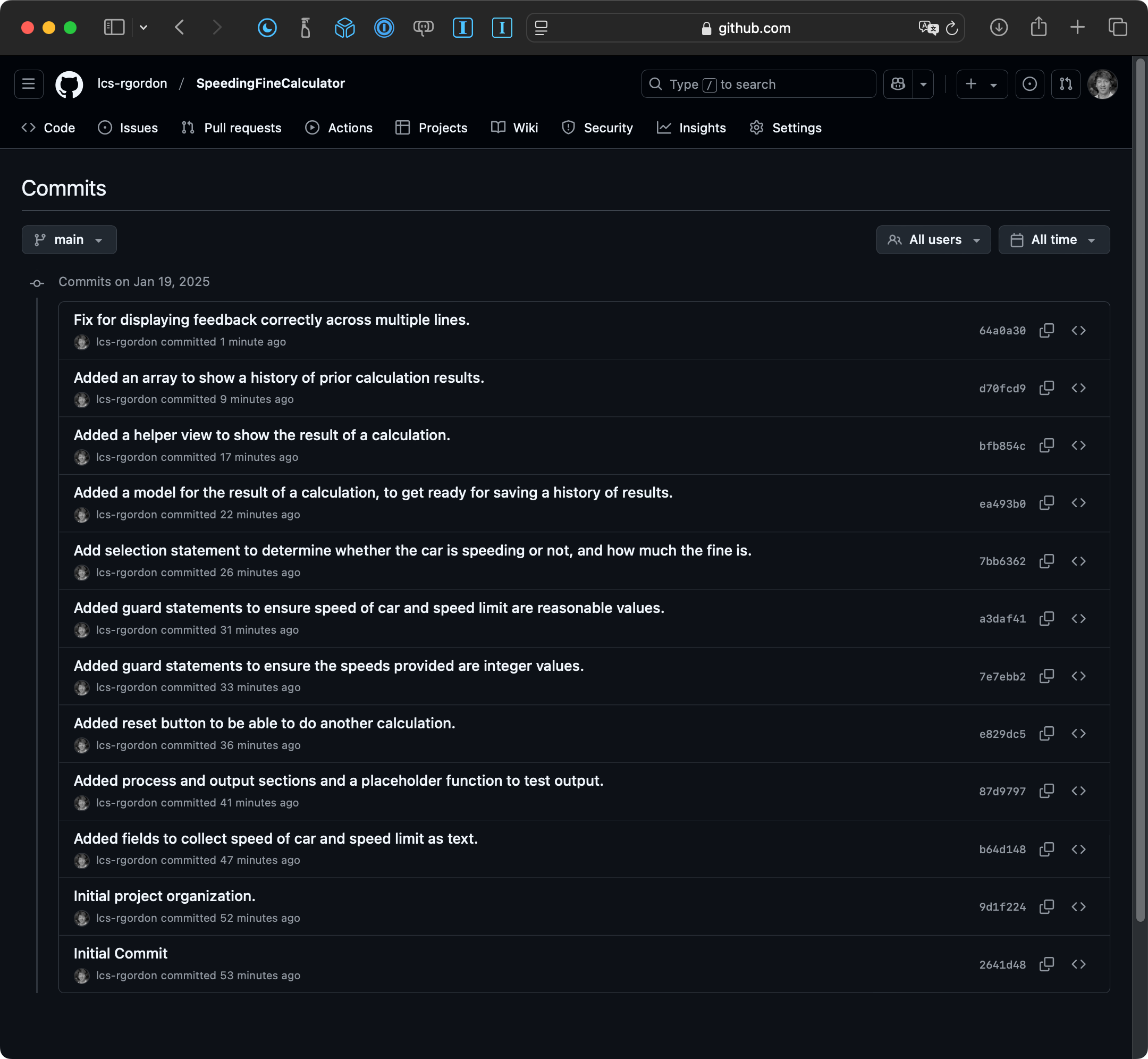
You have used source control well by committing and pushing your work to a remote on GitHub at regular intervals.
-
You apply abstraction where possible, for example, through the use of helper views or subviews.
-
You made reasonable choices about what type of input controls to use.
-
To exceed expectations, you can show a history of calculations made in your app.
IMPORTANT
You may only work on this task while in class.
You are encouraged to chat about ideas with your peers, but their hands should never be on your keyboard, or vice-versa.
You can search the web for formulas, for example, but may not use a large language model (ChatGPT and similar) to ask for help.
You can consult any past code that you wrote, or anything on our class website, or any code examples in your copy of SwiftUI Views Mastery.
Exemplar
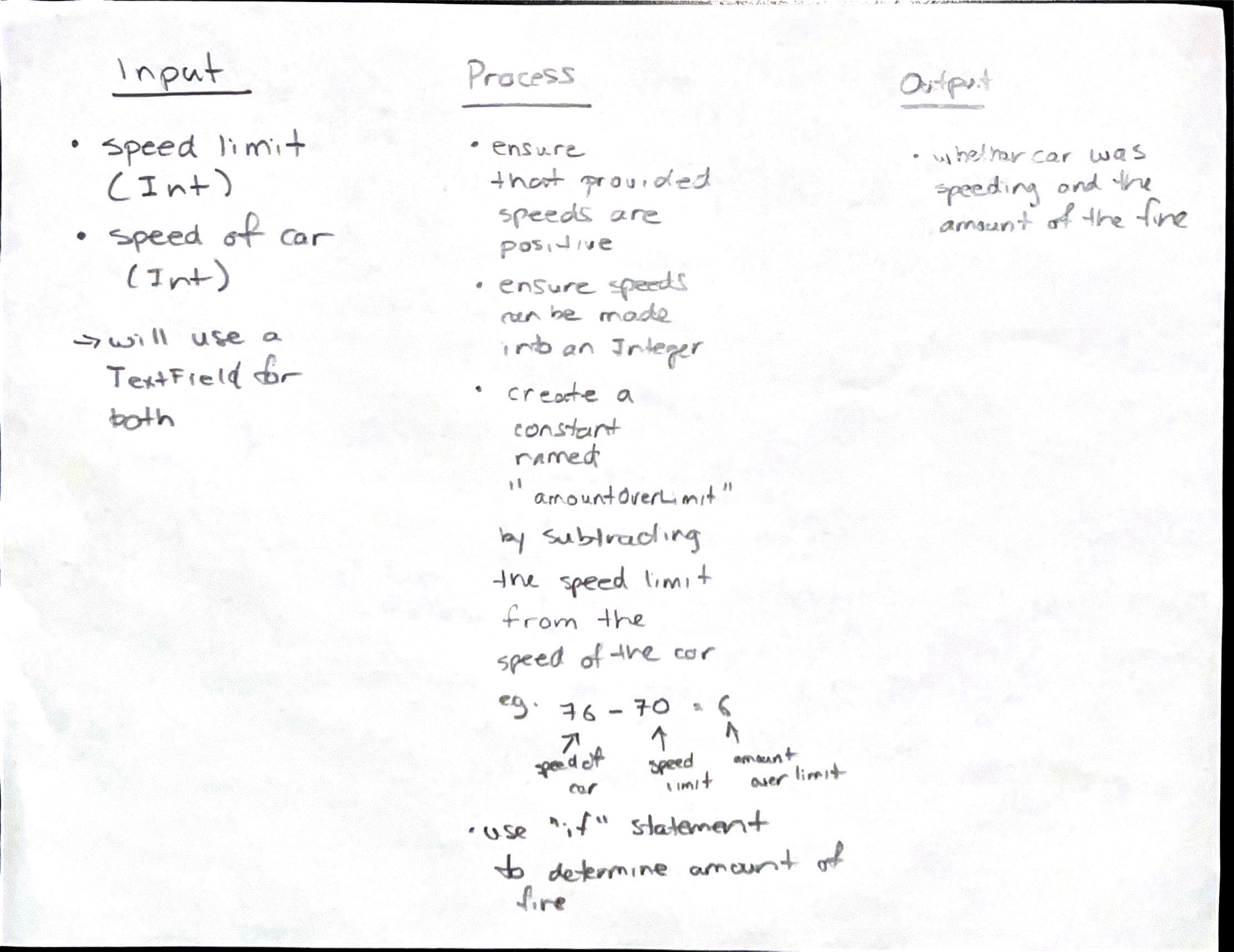
Mr. Gordon’s program is a speeding fine calculator (he’s hoping he might eventually win a contract to include a version of this program in photo radar devices to be used soon in Peterborough County.)
Inputs are the current speed limit, and the recorded speed of the car in question.
Output is whether the car was speeding or not, and if so, the amount of the fine, according to this chart:
| km/h over the limit | fine |
|---|---|
| 1 to 20 | $100 |
| 21 to 30 | $270 |
| 31 and above | $500 |
Here is Mr. Gordon’s input-process-output (IPO) chart:
Here is Mr. Gordon’s list of commits:
Here is a short video of Mr. Gordon’s finished product:
Getting started
You will be randomly assigned a topic from the list below by drawing from a hat. If you do not like your selection, you can either trade with someone else in class, or select again once everyone else has selected a first time (there are 20 ideas and 16 students in our class).
Based on your topic, author your plan in the form of an input-process-output (IPO) chart.
Once Mr. Gordon has discussed your IPO chart with you and initialled it to provide his approval, you may begin coding.
Begin coding by creating a new iOS project and then immediately adding a remote repository. Call Mr. Gordon over to your desk to show him that your remote was created successfully.
Due date
The task is due by the end of class this Wednesday, January 22, 2025.
That means you have three working periods, a total of more than four hours, to complete this task.
Handing in your work
Create a portfolio post that shares:
- your IPO chart
- a screenshot of your list of commits
- a short video that demonstrates your completed application
List of potential apps
Each person in class will author an app to complete one of the following programs:
1. Tip Calculator
Input: Bill amount (TextField) and tip percentage (Slider or Stepper).
Output: Displays the calculated tip amount and the total bill (bill + tip).
2. Savings Goal Tracker
Input: Current savings amount (TextField), target savings amount (TextField), and monthly contribution (Stepper).
Output: Displays the number of months required to reach the savings goal.
3. Temperature Converter
Input: Temperature value (TextField) and a toggle to choose whether the input given is in Celsius or Fahrenheit.
Output: Displays the converted temperature in the other unit.
4. Grade Calculator
Input: Marks for three assignments (TextFields or Steppers).
Output: Displays the average grade and a letter grade (e.g., A, B, C).
5. Age Calculator
Input: Birth year (TextField or Stepper).
Output: Displays the user’s age in years, and whether they are considered a “Boomer”, a member of “Generation X”, a “millennial”, a member of “Generation Z”, or “Gen Alpha”. You can use this source to learn which generation is which.
6. Random Name Picker
Input: The user provides five names that are added to a list.
Output: Displays one randomly selected name from the list. As a bonus, your program is not fixed to accept only five names, but accepts any number of names, then randomly selects a name from that list.
7. Loan Payment Calculator
Input: Loan amount (TextField), simple interest rate (Slider or Stepper), and loan term in years (Stepper).
Output: Displays the monthly payment amount.
8. Days Until Birthday
Input: Birthdate (Two TextFields, one to collect month in MM, another to collect day in DD format).
Output: Displays the number of days until the next birthday, relative to the current date. Here is a primer on how to work with dates in Swift.
9. Speed Calculator
Input: Distance traveled (TextField) and time taken (TextField).
Output: Displays the speed in meters per second or kilometers per hour.
10. Rock-Paper-Scissors Game
Input: Player’s choice (Buttons for Rock, Paper, Scissors).
Output: Displays the computer’s random choice and whether the player won, lost, or tied.
11. Discount Calculator
Input: Original price (TextField) and discount percentage (Slider or Stepper).
Output: Displays the discounted price.
12. Time Converter
Input: Time in hours (TextField).
Output: Displays the equivalent time in minutes and seconds.
13. Triangle Type Checker
Input: Lengths of three sides of a triangle (TextFields).
Output: Displays whether the triangle is equilateral, isosceles, or scalene.
14. Dice Roller
Input: Number of dice to roll (Stepper, up to 6 dice).
Output: Displays the result of rolling the specified number of dice and their total.
15. Shopping Cart Total
Input: Prices of three items (TextFields).
Output: Displays the total price and applicable sales tax.
16. Leap Year Checker
Input: A year (TextField).
Output: Displays whether the year is a leap year or not.
17. Number Facts
Input: An integer (TextField).
Output: Displays whether the number is even or odd, prime or composite, and its square and cube.
18. Fuel Efficiency Calculator
Input: Distance traveled (TextField) and fuel used (TextField).
Output: Displays the fuel efficiency in liters per 100 kilometers or miles per gallon.
19. Currency Converter
Input: Amount in Canadian dollars (TextField) and a toggle to choose a currency (e.g., USD, EUR).
Output: Displays the converted amount. You may look up the exchange rates and hard-code these into your program.
20. Daily Calorie Needs
Input: Weight in kilograms (TextField), height in centimeters (TextField), age in years (Stepper), and activity level (Slider).
Output: Displays the estimated daily caloric needs, in kcal/day.